Introduction
We usually encounter the following situation when we use SSH to log on to a remote computer or a server, then start a task in the foreground, and the task is more complex and bigger, it will not be finished in a short peroid of time, but we need to close the terminal for some reasons. If we close the terminal, the process will be terminated too. We don’t want to stop it right now, how can we handle this problem?
Before dealing with this case, you must have some background knowledge about job control in Bash. Let us create a bash job first:1
ping -i 5 google.com
Terminating a Process
There are 3 ways that can terminate processes in our system.
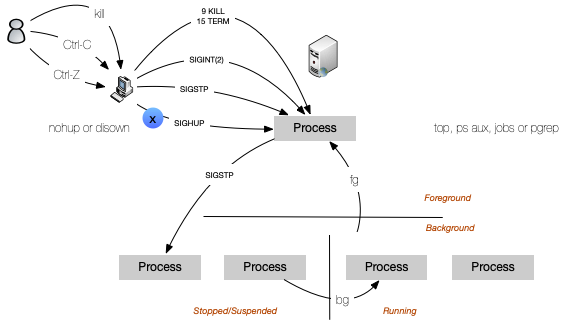
In a terminal, hold the control key, and press ‘c’. This will stop the process that we have started in the foreground.
1
2
3
4
5
6
7
8
9
10
11
12
➜ Magicefire ping -i 5 google.com
PING google.com (172.217.12.46): 56 data bytes
64 bytes from 172.217.12.46: icmp_seq=0 ttl=52 time=64.537 ms
64 bytes from 172.217.12.46: icmp_seq=1 ttl=52 time=63.335 ms
64 bytes from 172.217.12.46: icmp_seq=2 ttl=52 time=62.896 ms
64 bytes from 172.217.12.46: icmp_seq=3 ttl=52 time=64.476 ms
64 bytes from 172.217.12.46: icmp_seq=4 ttl=52 time=63.338 ms
64 bytes from 172.217.12.46: icmp_seq=5 ttl=52 time=62.164 ms
^C
--- google.com ping statistics ---
6 packets transmitted, 6 packets received, 0.0% packet loss
round-trip min/avg/max/stddev = 62.164/63.458/64.537/0.839 msPassing signals to a process with the
killcommand. Open another terminal, you can run these two commands here,-KILLequals 9.1
2kill -9 pid
kill -KILL pidIn the previous terminal, the process will receive a SIGINT signal, and it will be killed immediately.
1
2
3
4
5
6
7
8
9➜ Magicefire ping -i 5 google.com
PING google.com (172.217.12.46): 56 data bytes
64 bytes from 172.217.12.46: icmp_seq=0 ttl=52 time=61.794 ms
64 bytes from 172.217.12.46: icmp_seq=1 ttl=52 time=62.411 ms
64 bytes from 172.217.12.46: icmp_seq=2 ttl=52 time=62.325 ms
64 bytes from 172.217.12.46: icmp_seq=3 ttl=52 time=101.183 ms
64 bytes from 172.217.12.46: icmp_seq=4 ttl=52 time=63.707 ms
64 bytes from 172.217.12.46: icmp_seq=5 ttl=52 time=62.623 ms
[1] 91977 killed ping -i 5 google.comYou can also stop it with these arguments:
1
2
kill -15 pid
kill -TERM pid-TERMequals 15 here.The process will receive a SIGSTP, it will be terminated by the system.
1
2
3
4
5
6
➜ Magicefire ping -i 5 google.com
PING google.com (172.217.1.142): 56 data bytes
64 bytes from 172.217.1.142: icmp_seq=0 ttl=52 time=62.230 ms
64 bytes from 172.217.1.142: icmp_seq=1 ttl=52 time=63.578 ms
64 bytes from 172.217.1.142: icmp_seq=2 ttl=52 time=64.368 ms
[1] 92134 terminated ping -i 5 google.comClosing the terminal
Because the process is tied with the terminal instance that started it, when the terminal is closed, it will send a SIGUP signal to all of the processes tied to it.
The Solution
Now we have a process running in the foreground, we need to keep it running when we close the therminal. Before we close the terminal, we will take seveval steps to change it status, so it will not be stopped by ourselves.
Ctrl-Z → send a SIGSTP signal to the process, and push the process back into the backgroud(job), then the process will be stopped.
1
2
3
4
5
6
7
8
➜ Magicefire ping -i 5 google.com
PING google.com (172.217.6.174): 56 data bytes
64 bytes from 172.217.6.174: icmp_seq=0 ttl=52 time=63.851 ms
64 bytes from 172.217.6.174: icmp_seq=1 ttl=52 time=64.006 ms
64 bytes from 172.217.6.174: icmp_seq=2 ttl=52 time=64.434 ms
64 bytes from 172.217.6.174: icmp_seq=3 ttl=52 time=64.592 ms
^Z
[1] + 92544 suspended ping -i 5 google.com1
2➜ Magicefire jobs
[1] + suspended ping -i 5 google.combg → resume the process in the background again.
1
2
3
4
5
6
7➜ Magicefire bg
[1] + 92544 continued ping -i 5 google.com
➜ Magicefire 64 bytes from 172.217.6.174: icmp_seq=4 ttl=52 time=63.830 ms
➜ Magicefire jobs64 bytes from 172.217.6.174: icmp_seq=5 ttl=52 time=64.827 ms
[1] + running ping -i 5 google.comYou can type
jobsto check the job and get its job number.disown %jobNUmber -> detach the job from the terminal
1
disown %1
The command disown will immune the SIGUP signal.
Now we can close the terminal safely.
When we back, we can use the command top, ps aux, or pgrep -a name, to get the PID of the process that we detached from the closed terminal. But now the only thing we can do is killing it:(. So if you want to monitor the status of this process, you’d better to redirect its output into a file.1
ping -i 5 google.com > ping.out
Using nohup
If you know when starting the process that you will want to close the terminal before the process completes, you can start it using the nohup command.1
nohup ping -i 5 google.com > ping.out &
Cheat Sheet Diagram
References
How To Use ps, kill, and nice to Manage Processes in Linux
How To Use Bash’s Job Control to Manage Foreground and Background Processes